blob: a02ed97ff45e59a974d996d5221579d851a6c715 (
plain)
1
2
3
4
5
6
7
8
9
10
11
12
13
14
15
16
17
18
19
20
21
22
23
24
25
26
27
28
29
30
31
32
33
34
35
36
37
38
39
40
41
42
43
44
45
46
47
48
49
50
51
52
53
54
55
56
57
58
59
60
61
62
63
64
65
66
67
68
69
70
71
72
73
74
75
76
77
78
79
80
81
82
83
84
85
86
87
88
89
90
91
92
93
94
95
96
97
98
99
100
101
102
103
104
105
106
107
108
109
110
111
112
113
114
115
116
117
118
119
120
121
|
# Pehtheme Hugo
Pehtheme Hugo is an open-source Hugo theme inspired by [Material Design v3](https://m3.material.io/), lovingly crafted using Tailwind CSS.
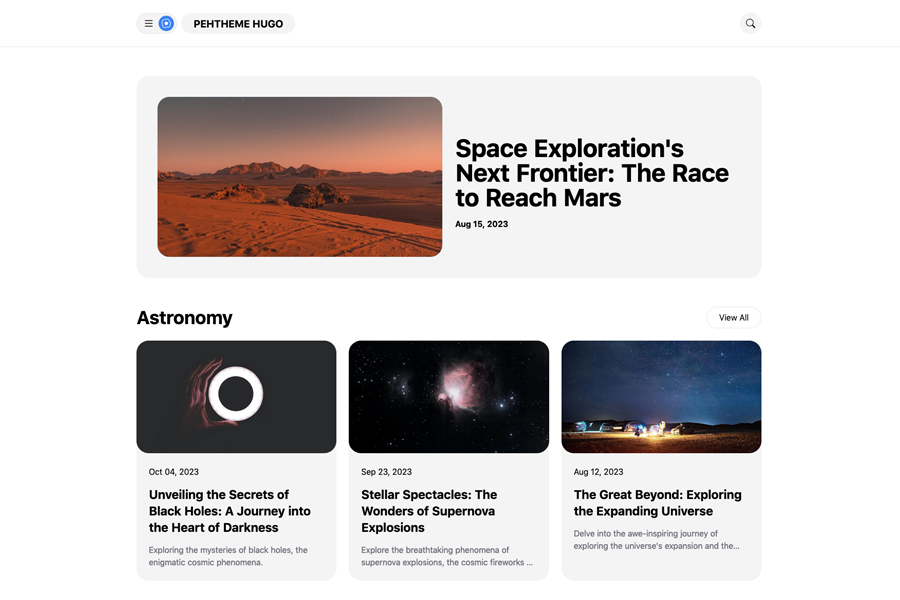
## Live Demo
Check out the live demo: [Pehtheme Hugo Live Demo](https://pehtheme-hugo.netlify.app/)
## Performance Testing
To assess the performance of your website using Pehtheme Hugo, utilize the PageSpeed Insights tool. Click the button below to run a PageSpeed Insights test:
[PageSpeed Insights Test](https://pagespeed.web.dev/analysis/https-pehtheme-hugo-netlify-app/7gv9zedw83?form_factor=mobile)
## Features
- Built with Tailwind CSS
- Featured posts displayed on the homepage (To showcase featured posts on the homepage, the Hugo theme uses `feature` tags data)
- Horizontal menus, content tags list
- No JavaScript dependencies
- Vanilla JS toggle button
- Two-column blog layout
- Sidebar with a list of recent posts
- Semantic HTML
- Sidebar Ads box
## Installation
To get started with Pehtheme Hugo, follow these steps:
1. Install Hugo and create a new site. For detailed instructions, refer to [Hugo's Quick Start Guide](https://gohugo.io/getting-started/quick-start/).
2. Add Pehtheme Hugo to your project:
```bash
$ git clone https://github.com/fauzanmy/pehtheme-hugo.git
```
3. Simply copy the following 2 folders and 1 content from the `exampleSite` directory to the root of your project:
```bash
exampleSite/
├── assets/
├── content/
└── hugo.toml
```
4. Start Hugo:
```bash
hugo server
```
## Configuration
You can configure the following settings in your Hugo project:
- `paginate` = '6' (Set the desired number of home posts per page)
- `summaryLength` = '20' (Approximately 160 characters for 20 words)
- `googleAnalytics` = '' (Your GA-4 analytics code)
- `disqusShortname` = '' (Your Disqus shortname)
## Custom Theme
1. Ensure you have NodeJS installed on your desktop.
2. Copy the Node.js configuration files from the `exampleSite` directory to the root of your Hugo project:
```bash
exampleSite/
├── package.json
├── postcss.config.js
└── tailwind.config.js
```
3. Additionally, copy the `exampleSite/input.css` file to the `assets/input.css` directory of your Hugo project.
4. Run the following command to install necessary dependencies:
```bash
npm install
```
5. Customize the theme with Tailwind CSS using the following command:
```bash
npm run dev
```
6. To build the website, execute the command:
```bash
npm run build
```
## License
Pehtheme Hugo is MIT Licensed. For more details, see the [LICENSE](https://github.com/fauzanmy/pehtheme-hugo/blob/main/LICENSE) file.
## Logo Icon
Egg fried icon source: [Bootstrap Icons - Egg Fried](https://icons.getbootstrap.com/icons/egg-fried/)
## Photo Credits
Image credits used in the live preview:
```
Images resource:
- https://unsplash.com/photos/Smeer5L0tXM
- https://unsplash.com/photos/2q6C5zDJOsg
- https://unsplash.com/photos/UNd3lRKhwSw
- https://unsplash.com/photos/Ed2AELHKYBw
- https://unsplash.com/photos/rTZW4f02zY8
- https://unsplash.com/photos/OtXJhYjbKeg
- https://unsplash.com/photos/ZPP-zP8HYG0
- https://unsplash.com/photos/ydGRmobx5jA
- https://pixabay.com/vectors/email-newsletter-email-marketing-3249062/
```
|
